Auto TP & SL
When you open a Buy/Sell position on MetaTrader, you have to enter the Take Profit (TP) and Stop Loss (SL) price manually. With FastBTN, you can do this automatically, saving you a significant amount of time.
What Auto TP & SL Do
When Auto TP and/or Auto SL are enabled:
- TP and SL levels are applied immediately when a trade is opened
- The same logic applies to both Buy and Sell positions
- Values are calculated based on your input settings
This ensures every trade follows your predefined risk rules.
Only for trades opened by FastBTN
 The default value is
 true.
Value: True
When you set this option to true, then TP & SL prices will be applied exclusively to positions opened using FastBTN’s Buy & Sell buttons.
Note: Any positions opened manually, by other EAs, or prior to activating this setting will remain unaffected.
Value: False
But if you set this option to false, FastBTN will apply TP & SL prices to:
- All future positions for the current pair, regardless of whether they are opened via FastBTN or any other means.
- All existing positions for the current pair (including those opened via other means) that do not currently have a TP & SL.
Note: FastBTN will not modify or overwrite any existing TP & SL.
Example
So if you:
- Set this option to
true - Enable Auto TP and Auto SL to
true - Open 3 Buy positions using MT5’s quick trading buttons (NOT FastBTN), without applying TP & SL
- Switch this option to
false
Then FastBTN will apply TP & SL to those 3 Buy positions you just opened.
Important
Important
When you set this option to false, even if you remove TP & SL on current pair, FastBTN will check that they don’t have TP & SL, and then set TP & SL again to them.
So if you want some positions to have TP & SL and some don’t, or for all positions to not have TP & SL, please set this option to true.
Auto TP & Auto SL
For Auto TP and Auto SL, you can enable/disable them by setting them to true/false.
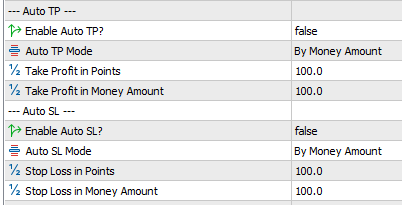
Auto TP & SL Mode
For both Auto TP Mode and Auto SL Mode, you can choose for each, whether to set TP & SL based on point or money amount.
1. By Money Amount
The easiest option is choosing By Money Amount where FastBTN will automatically calculate the price to get to the TP / SL amount you set.
For example, if current BTC/USD price is 90222.75 and you set:
| Auto TP | Auto SL | |
|---|---|---|
| Enabled | true | true |
| Mode | By Money Amount | By Money Amount |
| Money Amount | 100 | 150 |
Then if you Buy BTC/USD:
- 0.1 lot: FastBTN will set its TP to 91222.75 and SL to 88722.75.
- 0.2 lot: FastBTN will set its TP to 90722.75 and SL to 89472.5
Because of fast price movement, sometimes FastBTN will not set TP & SL precisely 100%, but still very close. Like on the example above, the TP and SL maybe set to 91229.38 and 88729.38 while it should be 91222.75 and 88722.75
2. By Point
If you choose to set Auto TP & SL by point, then the lot size doesn’t matter.
For example, if current BTC/USD price is 90202.75 and you set:
| Auto TP | Auto SL | |
|---|---|---|
| Enabled | true | true |
| Mode | By Point | By Point |
| Points | 100,000 | 100,000 |
Then if you buy BTC/USD by 0.1 lot, 0.2 lot, or 1 lot, FastBTN will set their TP to 91202.75 and SL to 89202.75.
Please note that if you use Points for Auto TP & SL, you must enter the correct points as it may be different for every pair. Please try this feature out in a demo account first.
Troubleshoot
If you put the wrong money amount or points in the setting, you may fail to open a Buy or Sell position. Usually because the range is too small.
For example, in BTC/USD, if you set Auto TP & SL mode = By Point and mistakenly put 1,000 in the Points amount, no positions will be opened when you try to Buy/Sell.
You can check the Experts tab to see if there are any errors.
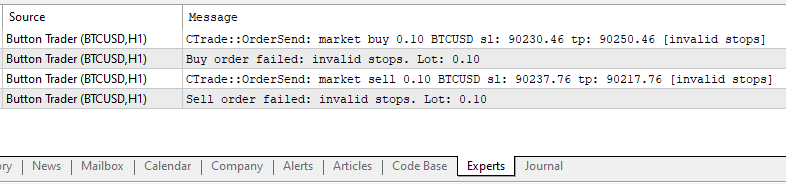
If on the same example above you also set Only for trades opened by FastBTN to false, and you open 4 positions using MT5’s Buy / Sell function without setting TP & SL, FastBTN will also fail to set TP & SL to those 4 positions.
Interaction with Buy and Sell Buttons
When Auto TP or SL is enabled:
- Clicking FastBTN’s Buy or Sell buttons will automatically include TP and/or SL
- Manual trades placed without FastBTN are not affected
- TP and SL behavior is identical for both directions
This allows you to focus on execution without worrying about forgetting risk controls.
Important Notes
- Auto TP and SL do not guarantee execution at the exact price due to slippage
- Very tight TP or SL values may cause order rejection
- Always test TP and SL settings on a demo account first