Check Before Open Position
FastBTN includes Check Before Open Position features that help prevent unwanted or risky trades from being opened. These checks act as safety filters and are evaluated before any Buy or Sell action is executed.
This feature checks for 4 conditions before opening a position. They are checked in this order:
- Maximum number of open positions on the current pair.
- Maximum number of lots on the current pair.
- Maximum number of open positions on all pairs.
- Maximum number of lots on all pairs.
If any one of these 4 conditions is met, FastBTN will not execute any Buy/Sell trade.
While FastBTN prevents you from opening new positions when a condition is met, you can still open positions using MT5’s own open trade function.
For example, you have these open positions:
| XAU/USD | BTC/USD | EUR/USD | GBP/USD | |
|---|---|---|---|---|
| Buy Positions | 10 | 3 | 0 | 2 |
| Buy Lots | 1 | 0.3 | 0 | 0.4 |
| Sell Positions | 0 | 1 | 5 | 3 |
| Sell Lots | 0 | 0.1 | 0.5 | 0.3 |
If on each pair you set it like this:
- Maximum number of open positions on current pair: 10
- Maximum number of lots on current pair: 2.0
- Maximum number of open positions on all pairs: 20
- Maximum number of lots on all pairs: 5
Then:
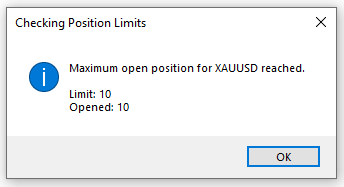
- On XAU/USD, you cannot open any more Buy/Sell positions using FastBTN because you’ve already hit the maximum threshold of 10 open positions, even though your total lots for XAU/USD haven’t reached 2 lots.
- On BTC/USD, you can open 1 more Buy/Sell position with a maximum of 1.7 lots because:
- You haven’t reached 10 open positions on BTC/USD. You currently have 3 open positions, so you have 7 remaining.
- You haven’t reached 2 lots of open positions on BTC/USD. You currently have 0.3 lots, so you can still add 1.7 lots.
- You currently have a total of 19 open positions on all pairs, so you still have 1 remaining.
- Your current total lots on all pairs is 2.6, so you still have 2.4 lots remaining.
You get the idea. Of course, you can use different settings for each pair, but it’s advised to use the same settings on all pairs for consistency.
This is useful to help you avoid opening unnecessary positions, especially when you’re emotional. I often open more averaging positions when I’m losing. With this feature enabled, when the warning appears, it means that if I still want to open a new position:
- I have to change my settings first, or
- I have to use MT5’s default interface
I find these to be cumbersome. Then I usually come to my senses and cancel opening any more positions. It won’t prevent you 100%, but it helps.