Close Buttons
FastBTN provides several Close buttons that allow you to close matching positions at market price quickly. Because closing trades affects your account immediately, it is important to understand how each Close button works before using it.
Warning
Please be extra careful when using these Close Buttons, as the actions will be executed immediately without any confirmation!
Test all Close buttons on a demo account first
You can control which Close buttons are visible on the chart through FastBTN input settings.
This allows you to:
- Hide buttons you don’t use
- Reduce clutter on the chart
- Prevent accidental clicks
For example, if you never close Buy and Sell positions separately, you may choose to show only the “Close All” button.
There are 6 Close Buttons available:
- 3 buttons for Current Pair (the pair where the button is on the chart)
- 3 buttons for All Pairs (all opened positions across all pairs)
Example
You have the following number of open positions:
| Pair | XAU/USD | EUR/USD | GBP/USD | GBP/JPY |
|---|---|---|---|---|
| Profit | 3 | 1 | 4 | 1 |
| Loss | 2 | 2 | 3 | 0 |
Close Positions on Current Pair
The buttons are (they are self-explanatory):
- Close Profit Positions on Current Pair
- Close Loss Positions on Current Pair
- Close All Positions on Current Pair
If you are currently on the XAU/USD chart, then:
1. Close Profit Positions on Current Pair ➡ will close all 3 profitable XAU/USD positions.
2. Close Loss Positions on Current Pair ➡ will close all 2 losing XAU/USD positions.
3. Close All Positions on Current Pair ➡ will close all 5 XAU/USD positions.
The positions on EUR/USD, GBP/USD, and GBP/JPY remain untouched.
Close Positions on All Pairs
Similar to above, but it will be executed on all open positions on all pairs.
The buttons are:
- Close All Profit Positions on All Pairs. It will close:
- 3 profit positions on XAU/USD
- 1 profit position on EUR/USD
- 4 profit positions on GBP/USD
- 1 profit position on GBP/JPY
- Close All Loss Positions on All Pairs. It will close:
- 2 loss positions on XAU/USD
- 2 loss positions on EUR/USD
- 3 loss positions on GBP/USD
- Close All Positions on All Pairs. It will close all 16 positions regardless of whether they are in profit or loss.
Close Buttons Settings
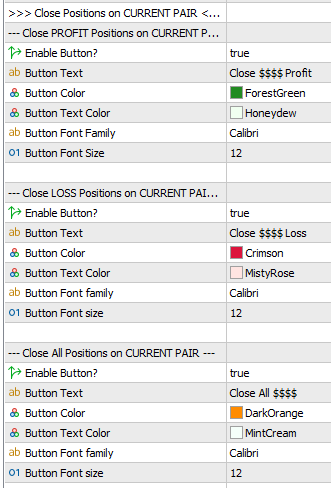
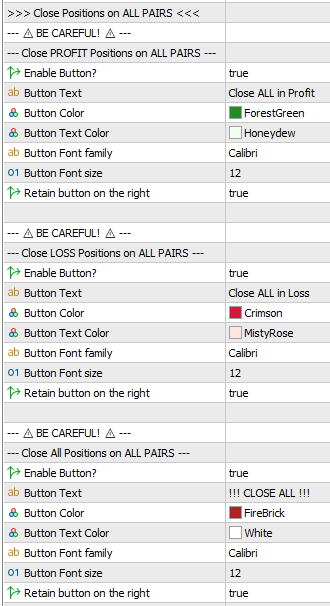
Enable / Disable
You can enable/disable each button by setting it to true/false. Disabling a button is useful if you want to avoid accidentally clicking a button that you think is too risky.
If a button is disabled:
• It will not be shown on the chart
• The shortcut key will not work
Positioning
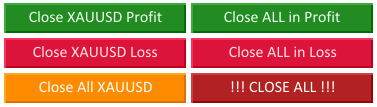
By default, the 6 Close Buttons are arranged in 2 columns like this:
If you set One Column Close Buttons = True in General Settings, then they will appear like this:
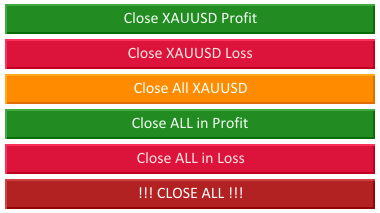
The close buttons shown above are using the default settings.
Styling
For each button, you can:
• Change the text.
• Change button color, text color, text font, and text size.
Tip
To show the current pair in the button text, use four dollar signs ($$$$). For example, if on XAU/USD you enter Close $$$$ Profit, it will display as Close XAUUSD Profit.
This is useful when you save FastBTN settings and load them on another pair—it will automatically show that pair’s symbol, so you don’t have to enter the symbol manually for each pair.