Comments
Overview
Aside of magic number, an EA can also identify itself using comments, when applicable. FastBTN uses comment to identify which button or shortcut key was pressed to execute a trade.
Comments can only be applied when executing trades, that is opening and closing trades. When you apply a TP or SL, for example, no comments can be made.
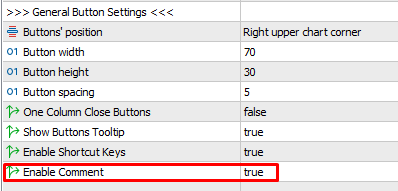
If you want FastBTN to use comments, please enable it in general settings.
Where Comments Appear
Toolbox
Press Ctrl + T to open the Toolbox. Then you at the bottom, select:
- Trade Tab
- History Tab
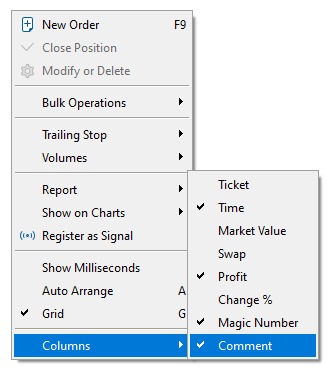
Make sure you enable the Comment column:
History Report
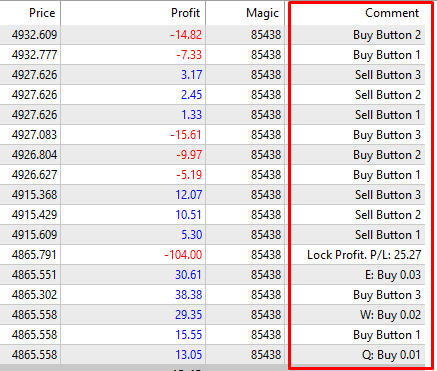
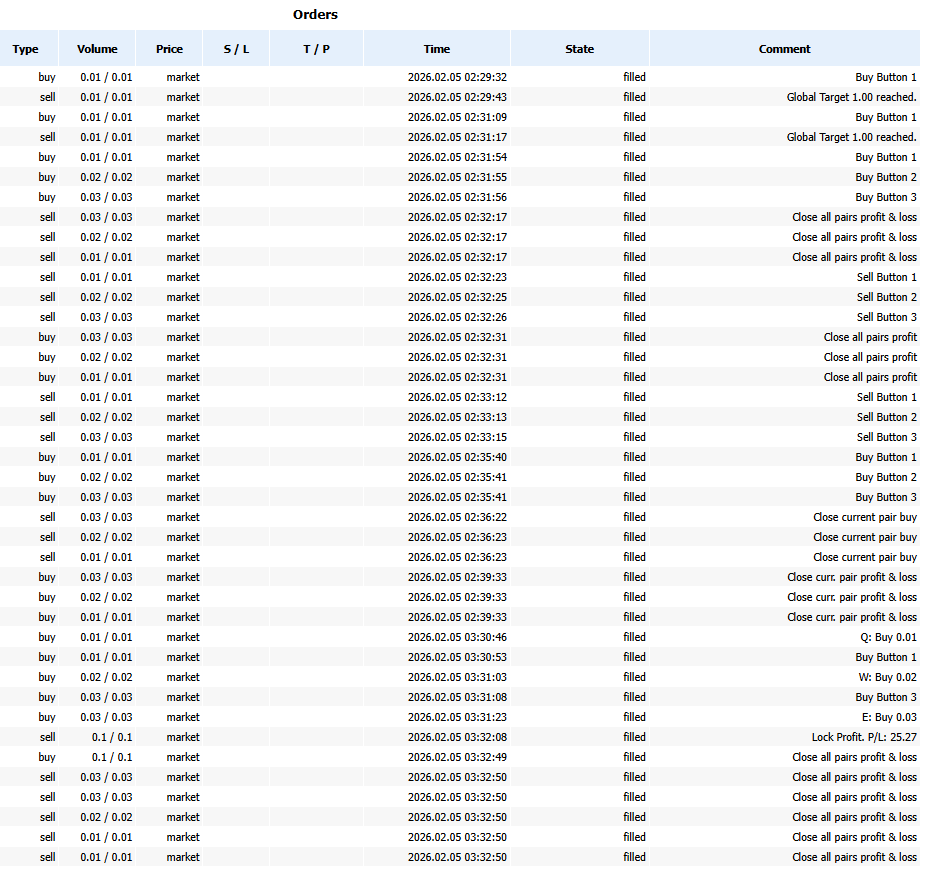
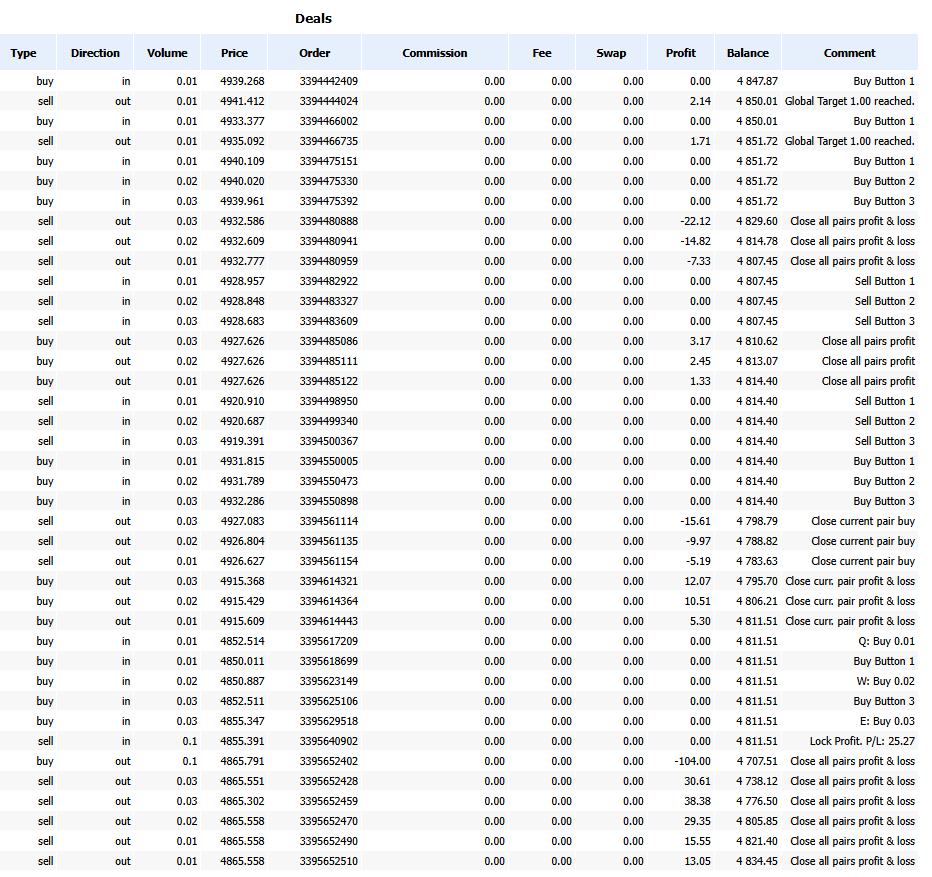
You get a complete report here. All comments for opening and closing trades appear in the history report.
To generate a report:
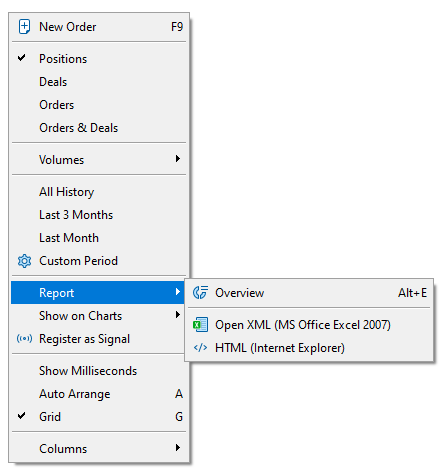
- Right click on your history.
- Select Report.
- Select either Open XML or HTML. Use HTML for more compatibility.
- Select the location on your computer where you want to save the file, give it a name, then click Save.
- MT5 will open your default spreadsheet software (Open XML) or browser (HTML).
Here you can see that the comments for opening and closing positions:
Other
You may see the comments on other reports such as daily email reports sent by your broker.
List of FastBTN Comments
FastBTN uses the following comments when executing a trade. The text varies to distinguish between button clicks and keyboard shortcuts. Comments are kept minimal due to character limits.
| Action | Button Clicked Comment |
Shortcut Pressed Comment |
|---|---|---|
| Buy Button 1 | Buy Button 1 | {key}: Buy {lot size} e.g., Q: Buy 0.1 |
| Buy Button 2 | Buy Button 2 | {key}: Buy {lot size} e.g., W: Buy 0.2 |
| Buy Button 3 | Buy Button 3 | {key}: Buy {lot size} e.g., E: Buy 0.3 |
| Buy Button 4 | Buy Button 4 | {key}: Buy {lot size} e.g., R: Buy 0.4 |
| Buy Button 5 | Buy Button 5 | {key}: Buy {lot size} e.g., T: Buy 0.5 |
| Sell Button 1 | Sell Button 1 | {key}: Sell {lot size} e.g., A: Sell 0.1 |
| Sell Button 2 | Sell Button 2 | {key}: Sell {lot size} e.g., S: Sell 0.2 |
| Sell Button 3 | Sell Button 3 | {key}: Sell {lot size} e.g., D: Sell 0.3 |
| Sell Button 4 | Sell Button 4 | {key}: Sell {lot size} e.g., F: Sell 0.4 |
| Sell Button 5 | Sell Button 5 | {key}: Sell {lot size} e.g., G: Sell 0.5 |
| Close profit positions on current pair |
Close curr. pair profit | {key}: Close curr. pair profit e.g., R: Close curr. pair profit |
| Close loss positions on current pair |
Close curr. pair loss | {key}: Close curr. pair loss e.g., F: Close curr. pair loss |
| Close all positions on current pair |
Close curr. pair profit & loss | {key}: Close curr. pair gain & loss e.g., V: Close curr. pair gain & loss |
| Close profit positions on all pairs |
Close all pairs profit | {key}: Close all pairs profit e.g., T: Close all pairs profit |
| Close loss positions on all pairs |
Close all pairs loss | {key}: Close all pairs loss e.g., G: Close all pairs loss |
| Close all positions on all pairs |
Close all pairs profit & loss | {key}: Close all pairs gain & loss e.g., B: Close all pairs gain & loss |
| Close all buy positions on current pair |
Close current pair buy | {key}: Close curr. pair buy e.g., Y: Close curr. pair buy |
| Close all sell positions on current pair |
Close current pair sell | {key}: Close curr. pair sell e.g., U: Close curr. pair sell |
| Close all buy positions on all pairs |
Close all pairs buy | {key}: Close all pairs buy e.g., I: Close all pairs buy |
| Close all sell positions on all pairs |
Close all pairs sell | {key}: Close all pairs sell e.g., O: Close all pairs sell |
| Close all positions on all pairs except current pair |
Close all except current | {key}: Close all except current e.g., P: Close all except current |
| Lock profit / Hedge | Lock profit. P/L {locked amount} e.g., Lock profit. P/L: 100 |
{key}: Lock profit. {locked amount} e.g., L: Lock profit. P/L: 100 |
For Auto Close when Target Reached, because it is automated (you don’t need to either click a button or press a shortcut), the comments are:
- On current pair: Target {profit amount} reached E.g., Target 100 reached
- On all pairs: Global target {profit amount} reached E.g., Global target 100 reached
Important Notes
- Since brokers can modify trade comments, the actual text appearing in your terminal / reports may differ from what is shown here.