Lock Profit / Hedging
Overview
Lock Profit / Hedging can protect accumulated profits by opening a hedge position. It helps prevent profitable trades from turning into losses during sudden market reversals.
This feature works only when all open positions on the current pair are in one direction. If you have both Buy and Sell positions open at the same time on the same pair, the this feature will not work. Mixed Buy and Sell positions are not supported.
With Lock Profit, FastBTN will immideately open a counter position (opposite direction) with the lot size of the total volume of the already opened position. For example, you have 5 profitable Buy positions on XAU/USD with a total volume of 1 lot. When you click the Lock Profit button, FastBTN will open a 1 lot Sell position.
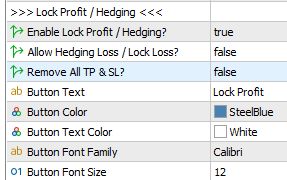
Enable Lock Profit
Lock Profit is enabled by default. To disable it, set it to false. When you disable it:
- The Lock Profit button will not be shown on the chart
- Its shortcut key will not work
Allow Hedging Loss / Lock Loss
Usually you’ll want to only lock your profit. But if you allow it, FastBTN will also open a position to hedge your loss.
Remove All TP & SL
Set it to true to remove all TP and SL from current pair. When you lock a profit, you may not want the locked positions to hit TP or SL.
For example, if you have 5 profitable Buy XAU/USD positions with a total of 1 lot and profit of $1,000 and you lock it, FastBTN will open a 1 lot Sell position. When each of those Buy positions hits its TP, you’ll be left with a 1 lot of a losing Sell position. You’ll lose more and more if the price goes up.
Button Appearance
Please refer to Button Appearance