Set TP / SL to Open Positions
In addition to Auto TP and Auto SL, FastBTN allows you to set, modify or remove Take Profit (TP) and Stop Loss (SL) for existing positions. This is useful when you want more control over individual trades after they are opened.
You can easily set TP & SL to open positions. Let’s go through them one by one.
Enabling and Color
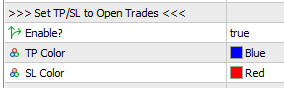
By enabling this option, these buttons will appear on your chart below the close buttons.
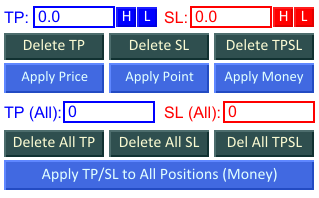
TP & SL Color
The TP Color and SL Color options are not for the buttons, but for the captions and text boxes. So if you set TP Color to Orange and SL Color to Purple, it will show something like this:
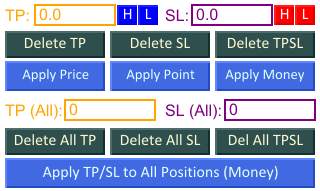 You can change the buttons’ color on their color properties. Please refer to Button Appearance.
Set TP & SL of All Open Positions on Current Pair to Highest / Lowest TP / SL
These 4 features work only when all open positions on the current symbol are in one direction. To use this feature, your open positions on the current pair must be Buy positions only or Sell positions only. Mixed Buy and Sell positions are not supported.
1. Set TP to Current Highest TP
This button is shown by the green arrow below:
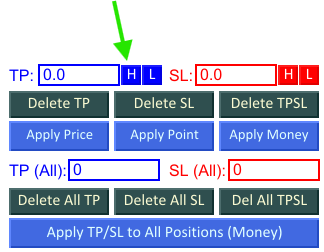
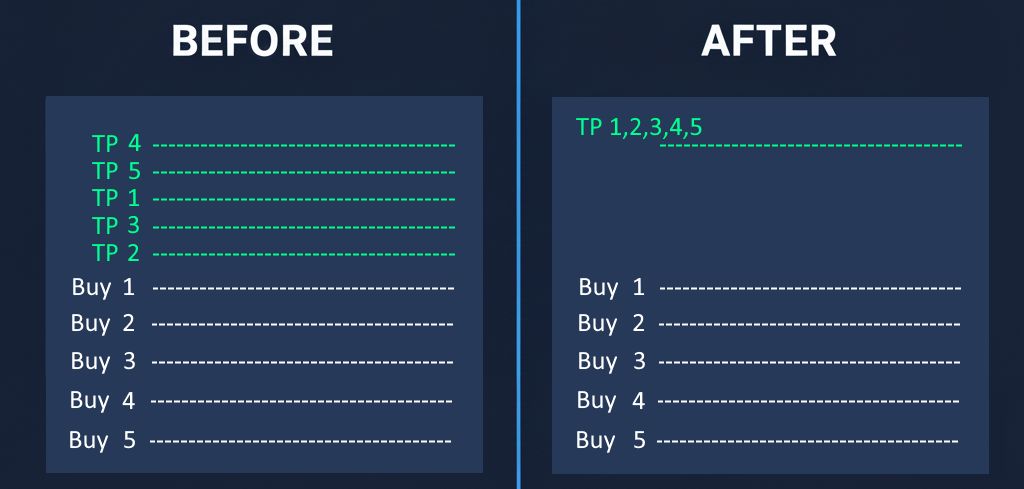
It will set the TP price of all open positions on current pair to the same TP price, that is the highest TP price previously set. If none of the open positions have any TP, then this button will do nothing.
1.1 Example: Buy Positions
- Pair: BTC/USD
- Volume: 0.1 lot each
- Direction: Buy
Before:
| No. | Open Price | TP Price | Potential Profit | SL Price | Potential Loss |
|---|---|---|---|---|---|
| 1. | 91350.00 | 93350.00 | $200.00 | 89350.00 | ($200.00) |
| 2. | 91300.00 | 92800.00 | $150.00 | 89800.00 | ($150.00) |
| 3. | 91250.00 | 92250.00 | $100.00 | 90250.00 | ($100.00) |
| 4. | 91200.00 | 91700.00 | $50.00 | 90700.00 | ($50.00) |
| 5. | 91150.00 | - | - | - | - |
After you click the Set All TP to Current Highest TP, they will become:
After:
| No. | Open Price | TP Price | Potential Profit | SL Price | Potential Loss |
|---|---|---|---|---|---|
| 1. | 91350.00 | 93350.00 | $200.00 | 89350.00 | ($200.00) |
| 2. | 91300.00 | 93350.00 | $205.00 | 89800.00 | ($150.00) |
| 3. | 91250.00 | 93350.00 | $210.00 | 90250.00 | ($100.00) |
| 4. | 91200.00 | 93350.00 | $215.00 | 90700.00 | ($50.00) |
| 5. | 91150.00 | 93350.00 | $220.00 | - | - |
To put it more simply, take a look at this image:
1.2 Example: Sell Positions
- Pair: BTC/USD
- Volume: 0.1 lot each
- Direction: Sell
Before:
| No. | Open Price | TP Price | Potential Profit | SL Price | Potential Loss |
|---|---|---|---|---|---|
| 1. | 91150.00 | 89150.00 | $200.00 | 93150.00 | ($200.00) |
| 2. | 91200.00 | 89700.00 | $150.00 | 92700.00 | ($150.00) |
| 3. | 91250.00 | 90250.00 | $100.00 | 92250.00 | ($100.00) |
| 4. | 91300.00 | 90800.00 | $50.00 | 91800.00 | ($50.00) |
| 5. | 91350.00 | - | - | - | - |
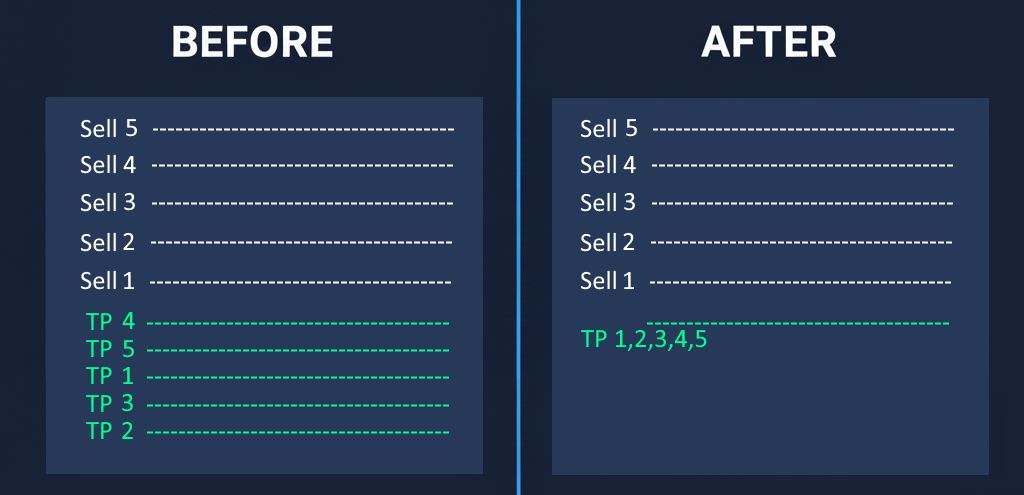
After you click the Set All TP to Current Highest TP, they will become:
After:
| No. | Open Price | TP Price | Potential Profit | SL Price | Potential Loss |
|---|---|---|---|---|---|
| 1. | 91150.00 | 90800.00 | $35.00 | 93150.00 | ($200.00) |
| 2. | 91200.00 | 90800.00 | $40.00 | 92700.00 | ($150.00) |
| 3. | 91250.00 | 90800.00 | $45.00 | 92250.00 | ($100.00) |
| 4. | 91300.00 | 90800.00 | $50.00 | 91800.00 | ($50.00) |
| 5. | 91350.00 | 90800.00 | $55.00 | - | - |
To put it more simply, take a look at this image:
2. Set TP to Current Lowest TP
This button is shown by the green arrow below:
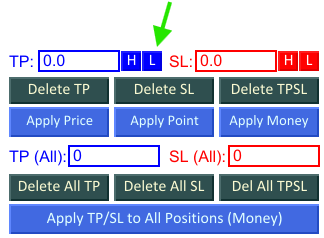
It will set the TP price of all open positions on current pair to the same TP price, that is the lowest TP price previously set. If none of the open positions have any TP, then this button will do nothing.
2.1 Example: Buy Positions
- Pair: BTC/USD
- Volume: 0.1 lot each
- Direction: Buy
Before:
| No. | Open Price | TP Price | Potential Profit | SL Price | Potential Loss |
|---|---|---|---|---|---|
| 1. | 91350.00 | 93350.00 | $200.00 | 89350.00 | ($200.00) |
| 2. | 91300.00 | 92800.00 | $150.00 | 89800.00 | ($150.00) |
| 3. | 91250.00 | 92250.00 | $100.00 | 90250.00 | ($100.00) |
| 4. | 91200.00 | 91700.00 | $50.00 | 90700.00 | ($50.00) |
| 5. | 91150.00 | - | - | - | - |
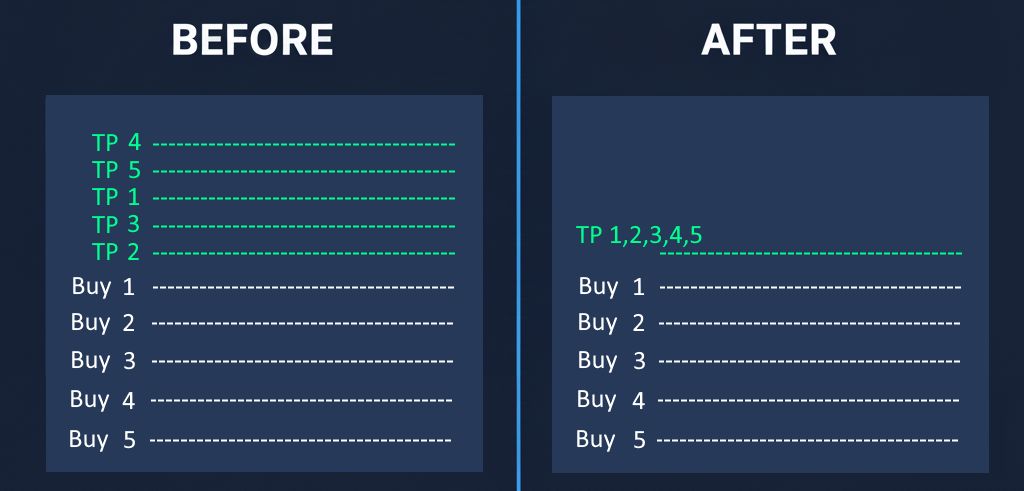
After you click the Set All TP to Current Lowest TP, they will become:
After:
| No. | Open Price | TP Price | Potential Profit | SL Price | Potential Loss |
|---|---|---|---|---|---|
| 1. | 91350.00 | 91700.00 | $35.00 | 89350.00 | ($200.00) |
| 2. | 91300.00 | 91700.00 | $40.00 | 89800.00 | ($150.00) |
| 3. | 91250.00 | 91700.00 | $45.00 | 90250.00 | ($100.00) |
| 4. | 91200.00 | 91700.00 | $50.00 | 90700.00 | ($50.00) |
| 5. | 91150.00 | 91700.00 | $55.00 | - | - |
To put it more simply, take a look at this image:
2.2 Example: Sell Positions
- Pair: BTC/USD
- Volume: 0.1 lot each
- Direction: Sell
Before:
| No. | Open Price | TP Price | Potential Profit | SL Price | Potential Loss |
|---|---|---|---|---|---|
| 1. | 91150.00 | 89150.00 | $200.00 | 93150.00 | ($200.00) |
| 2. | 91200.00 | 89700.00 | $150.00 | 92700.00 | ($150.00) |
| 3. | 91250.00 | 90250.00 | $100.00 | 92250.00 | ($100.00) |
| 4. | 91300.00 | 90800.00 | $50.00 | 91800.00 | ($50.00) |
| 5. | 91350.00 | - | - | - | - |
After you click the Set All TP to Current Lowest TP, they will become:
After:
| No. | Open Price | TP Price | Potential Profit | SL Price | Potential Loss |
|---|---|---|---|---|---|
| 1. | 91150.00 | 89150.00 | $200.00 | 93150.00 | ($200.00) |
| 2. | 91200.00 | 89150.00 | $205.00 | 92700.00 | ($150.00) |
| 3. | 91250.00 | 89150.00 | $210.00 | 92250.00 | ($100.00) |
| 4. | 91300.00 | 89150.00 | $215.00 | 91800.00 | ($50.00) |
| 5. | 91350.00 | 89150.00 | $220.00 | - | - |
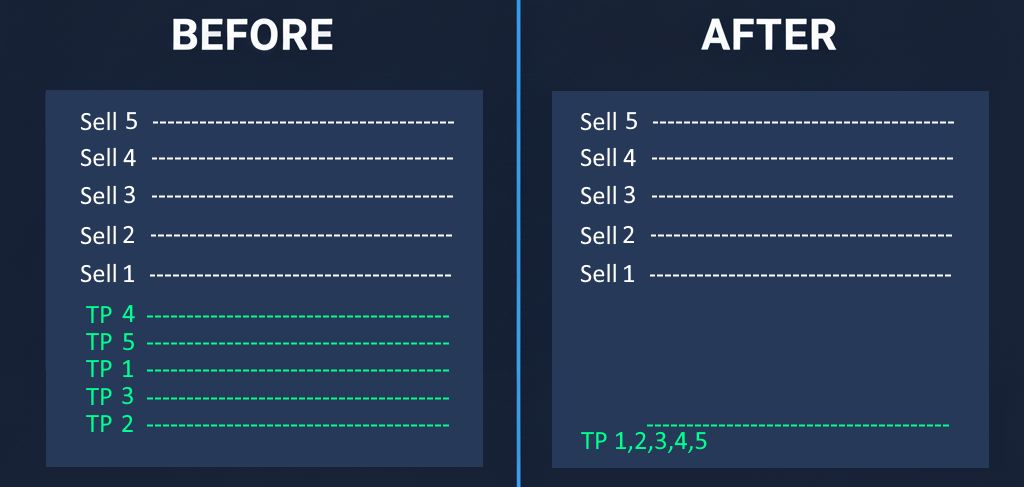
Please note that this button will set all TP to the lowest TP Price (89150.00), NOT the TP with lowest potential profit (money amount). That’s why you see increase in potential profits.
To put it more simply, take a look at this image:
3. Set SL to Current Highest SL
This button is shown by the green arrow below:
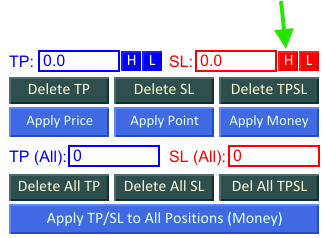
It will set the SL price of all open positions on current pair to the same SL price, that is the highest SL price previously set. If none of the open positions have any SL, then this butoon will do nothing.
3.1 Example: Buy Positions
- Pair: BTC/USD
- Volume: 0.1 lot each
- Direction: Buy
Before:
| No. | Open Price | TP Price | Potential Profit | SL Price | Potential Loss |
|---|---|---|---|---|---|
| 1. | 91350.00 | 93350.00 | $200.00 | 89350.00 | ($200.00) |
| 2. | 91300.00 | 92800.00 | $150.00 | 89800.00 | ($150.00) |
| 3. | 91250.00 | 92250.00 | $100.00 | 90250.00 | ($100.00) |
| 4. | 91200.00 | 91700.00 | $50.00 | 90700.00 | ($50.00) |
| 5. | 91150.00 | - | - | - | - |
After you click the Set All SL to Current Highest SL, they will become:
After:
| No. | Open Price | TP Price | Potential Profit | SL Price | Potential Loss |
|---|---|---|---|---|---|
| 1. | 91350.00 | 93350.00 | $200.00 | 90700.00 | ($65.00) |
| 2. | 91300.00 | 92800.00 | $150.00 | 90700.00 | ($60.00) |
| 3. | 91250.00 | 92250.00 | $100.00 | 90700.00 | ($55.00) |
| 4. | 91200.00 | 91700.00 | $50.00 | 90700.00 | ($50.00) |
| 5. | 91150.00 | - | - | 90700.00 | ($45.00) |
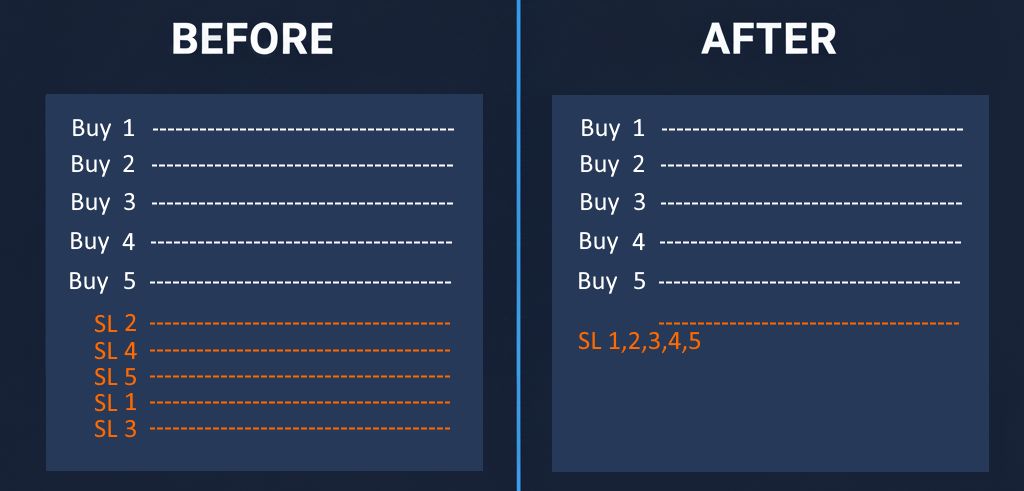
Please note that this button will set all SL to the highest SL Price (90700.00), NOT the SL with highest potential loss (money amount).
To put it more simply, take a look at this image:
3.2 Example: Sell Positions
- Pair: BTC/USD
- Volume: 0.1 lot each
- Direction: Sell
Before:
| No. | Open Price | TP Price | Potential Profit | SL Price | Potential Loss |
|---|---|---|---|---|---|
| 1. | 91150.00 | 89150.00 | $200.00 | 93150.00 | ($200.00) |
| 2. | 91200.00 | 89700.00 | $150.00 | 92700.00 | ($150.00) |
| 3. | 91250.00 | 90250.00 | $100.00 | 92250.00 | ($100.00) |
| 4. | 91300.00 | 90800.00 | $50.00 | 91800.00 | ($50.00) |
| 5. | 91350.00 | - | - | - | - |
After you click the Set All SL to Current Highest SL, they will become:
After:
| No. | Open Price | TP Price | Potential Profit | SL Price | Potential Loss |
|---|---|---|---|---|---|
| 1. | 91150.00 | 90800.00 | $200.00 | 93150.00 | ($200.00) |
| 2. | 91200.00 | 89700.00 | $150.00 | 93150.00 | ($195.00) |
| 3. | 91250.00 | 90250.00 | $100.00 | 93150.00 | ($190.00) |
| 4. | 91300.00 | 90800.00 | $50.00 | 93150.00 | ($185.00) |
| 5. | 91350.00 | - | - | 93150.00 | ($180.00) |
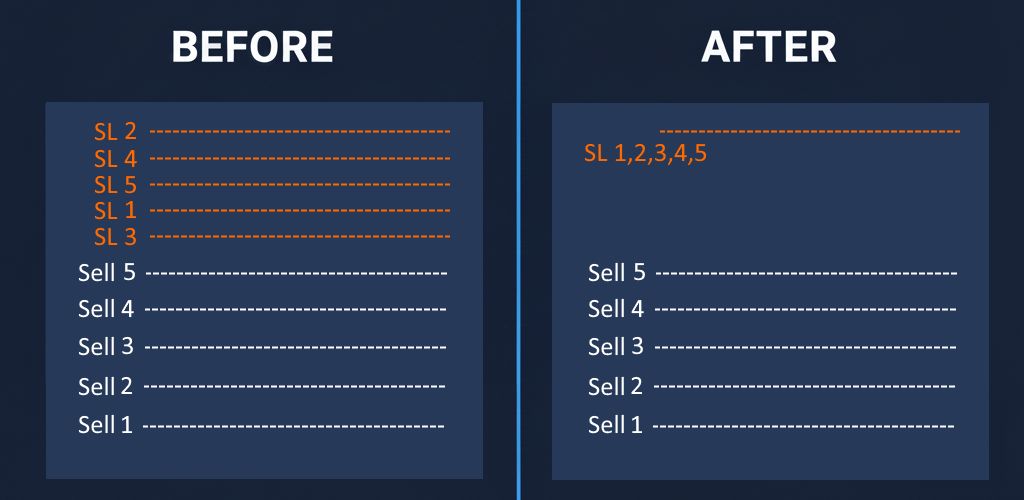
To put it more simply, take a look at this image:
4. Set SL to Current Lowest SL
This button is shown by the green arrow below:
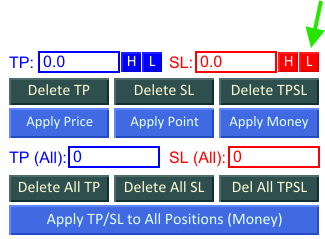
It will set the SL price of all open positions on current pair to the same SL price, that is the lowest SL price previously set. If none of the open positions have any SL, then this butoon will do nothing.
4.1 Example: Buy Positions
- Pair: BTC/USD
- Volume: 0.1 lot each
- Direction: Buy
Before:
| No. | Open Price | TP Price | Potential Profit | SL Price | Potential Loss |
|---|---|---|---|---|---|
| 1. | 91350.00 | 93350.00 | $200.00 | 89350.00 | ($200.00) |
| 2. | 91300.00 | 92800.00 | $150.00 | 89800.00 | ($150.00) |
| 3. | 91250.00 | 92250.00 | $100.00 | 90250.00 | ($100.00) |
| 4. | 91200.00 | 91700.00 | $50.00 | 90700.00 | ($50.00) |
| 5. | 91150.00 | - | - | - | - |
After you click the Set All SL to Current Lowest SL, they will become:
After:
| No. | Open Price | TP Price | Potential Profit | SL Price | Potential Loss |
|---|---|---|---|---|---|
| 1. | 91350.00 | 93350.00 | $200.00 | 89350.00 | ($200.00) |
| 2. | 91300.00 | 92800.00 | $150.00 | 89350.00 | ($195.00) |
| 3. | 91250.00 | 92250.00 | $100.00 | 89350.00 | ($190.00) |
| 4. | 91200.00 | 91700.00 | $50.00 | 89350.00 | ($185.00) |
| 5. | 91150.00 | - | - | 89350.00 | ($180.00) |
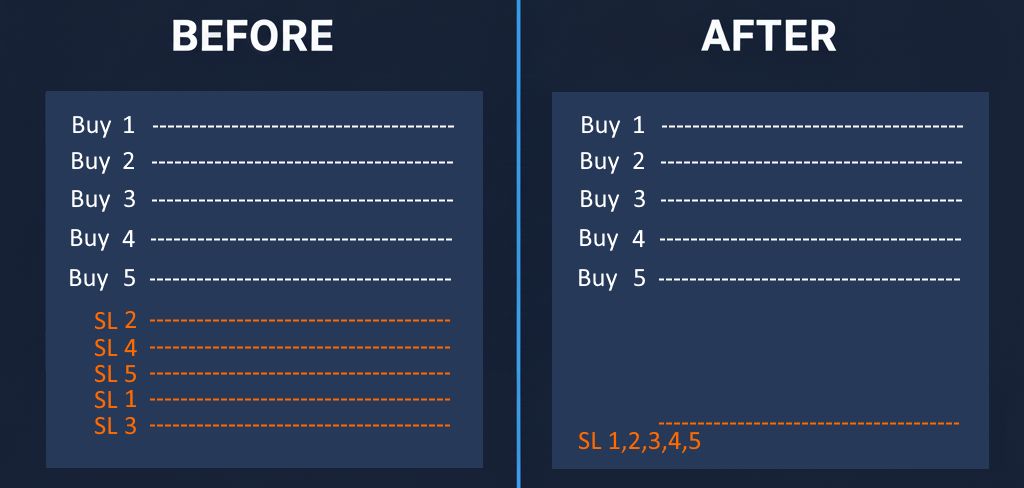
Please note that this button will set all SL to the lowest SL Price (89350.00), NOT the SL with the lowest potential loss amount.
To put it more simply, take a look at this image:
4.2 Example: Sell Positions
- Pair: BTC/USD
- Volume: 0.1 lot each
- Direction: Sell
Before:
| No. | Open Price | TP Price | Potential Profit | SL Price | Potential Loss |
|---|---|---|---|---|---|
| 1. | 91150.00 | 89150.00 | $200.00 | 93150.00 | ($200.00) |
| 2. | 91200.00 | 89700.00 | $150.00 | 92700.00 | ($150.00) |
| 3. | 91250.00 | 90250.00 | $100.00 | 92250.00 | ($100.00) |
| 4. | 91300.00 | 90800.00 | $50.00 | 91800.00 | ($50.00) |
| 5. | 91350.00 | - | - | - | - |
After you click the Set All SL to Current Lowest SL, they will become:
After:
| No. | Open Price | TP Price | Potential Profit | SL Price | Potential Loss |
|---|---|---|---|---|---|
| 1. | 91150.00 | 90800.00 | $200.00 | 91800.00 | ($65.00) |
| 2. | 91200.00 | 89700.00 | $150.00 | 91800.00 | ($60.00) |
| 3. | 91250.00 | 90250.00 | $100.00 | 91800.00 | ($55.00) |
| 4. | 91300.00 | 90800.00 | $50.00 | 91800.00 | ($50.00) |
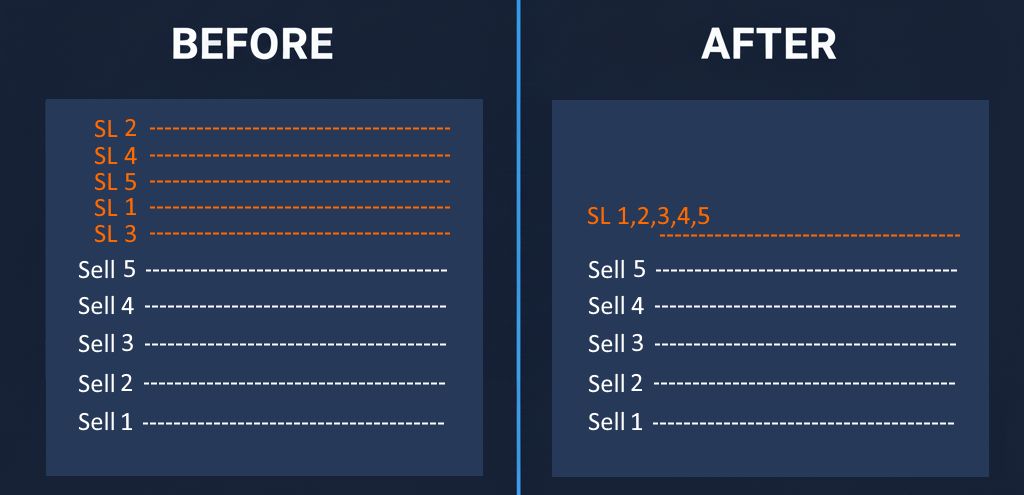
| 5. | 91350.00 | - | - | 91800.00 | ($45.00) |
To put it more simply, take a look at this image:
Important! Must Read
FastBTN DOES NOT check if modifying the TP / SL price will make your positions lose. For example, if you have 2 open BTC/USD Buy positions:
- Open price: 91336.00, TP price: 92836.00
- Open price: 90000.00, TP price: 91000.00
When you hit the Set All TP to Current Lowest TP button, then Position 1 TP price will be set to 91000.00, which is below its opening price of 91336.00, which will result in a loss when the TP price is reached. So be careful.
A good way to assist you with this is to show the Potential Profit / Loss from TP / SL.
Set TP & SL of All Open Positions on Current Pair by Price / Point / Money Amount
These features does not restrict you to have only open positions in one direction. You can have both open Buy and Sell positions at the same time.
For information on changing the Buttons’ appearance (color, text, font etc), please refer to Button Appearance
Delete TP, SL, or Both TP & SL from Curent Pair
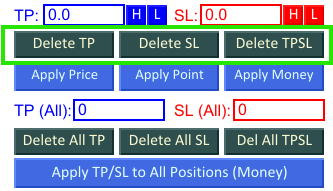
There are 3 buttons to delete current pair’s TP & SL. Look at the 3 buttons that are surrounded by the green square:
- Delete TP
This button will remove All TP from all open positions on current pair. - Delete SL
This button will remove All SL from all open positions on current pair. - Delete TPSL
This button will remove All TP and SL from all open positions on current pair.
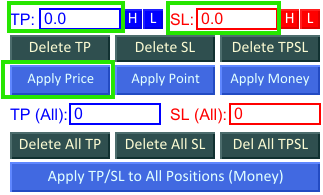
Set by Price
You can set TP and SL price of all open positions on current pair to your desired price. Just enter the TP price in the TP textbox, SL price in the SL textbox, then click Apply Price.
FastBTN will ignore 0 (zero). So if you only want to set the TP price without SL price (or leave current SL price as is), enter 0 (zero) in the SL textbox, and vice versa.
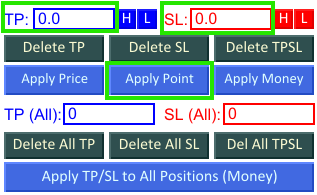
Set by Point
You can also set TP and SL of all open positions on current pair by point. For example, if you have 1 Buy position and 1 Sell position on BTC/USD and both have the open price of 91315.00, then if you enter 10000 on the TP textbox and 20000 in the SL textbox and you click Apply Point button, then:
- The Buy position will have TP of 91415.00 and SL of 91115.00
- The Sell position will have TP of 91215.00 and SL of 91515.00
FastBTN will ignore 0 (zero). So if you only want to set the TP by point without SL (or leave current SL as is), enter 0 (zero) in the SL textbox, and vice versa.
Set by Money Amount
This one is the easiest. You just need to determine how much money you want for profit, and how much money you are willing to lose for each open position on current pair and click the Apply Money button.
The image below shows an example on BTC/USD when you enter 100 in both the TP textbox and SL textbox (pay attention to the Volume size):
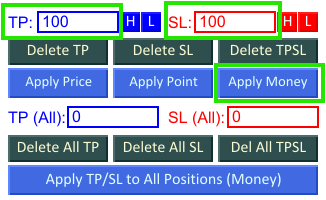
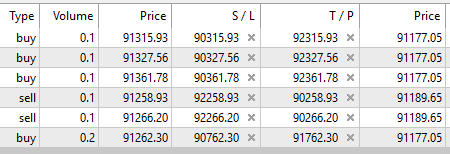
FastBTN will ignore 0 (zero). So if you only want to set the TP without SL (or leave current SL as is), enter 0 (zero) in the SL textbox, and vice versa.
Set TP & SL of All Open Positions on ALL Pairs by Money Amount
These features does not restrict you to have only open positions in one direction. You can have both open Buy and Sell positions at the same time.
For information on changing the Buttons’ appearance (color, text, font etc), please refer to Button Appearance
Delete TP, SL, or Both TP & SL from All Pairs
There are 3 buttons to delete all pair’s TP & SL. Look at the 3 buttons that are surrounded by the green square:
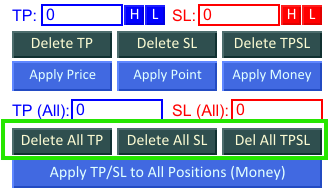
- Delete TP
This button will remove All TP from all open positions on ALL pair. - Delete SL
This button will remove All SL from all open positions on ALL pair. - Delete TPSL
This button will remove All TP and SL from all open positions on ALL pair.
Set TP & SL by Money Amount
Unlike setting TP & SL for current pair where you can set them by price, point, and money amount, you can only set TP & SL by money amount when setting them for all pairs.
Like setting TP & SL for current pair, you just need to determine how much money you want for profit (enter in TP (All) textbox) and how much money you are willing to lose (enter in SL (All) textbox) for each open position on all pair and click the Apply TP/SL to All Positions (Money) button.
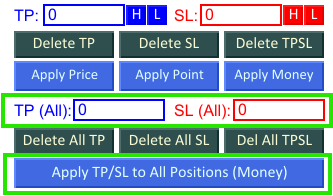
FastBTN will ignore 0 (zero). So if you only want to set the TP without SL (or leave current SL as is), enter 0 (zero) in the SL (All) textbox, and vice versa.
Interaction with Auto TP & SL
It is important to understand how manual TP / SL works together with Auto TP & SL:
- Auto TP / SL applies only when opening new trades
- Manual Set TP / SL modifies existing trades
- Using Set TP / SL does not change Auto TP / SL settings
This allows you to combine automatic and manual trade management as needed.
Important Notes
- Double-check the values before applying
- Be aware of broker minimum distance requirements
- Avoid setting TP or SL too close to the current price
- Test the behavior on a demo account first